Showing posts with label edtech. Show all posts

Friday, November 27, 2015

20 minutes of code

Today is the day after Thanksgiving and you know what that means: just 10 more coding days until Computer Science Education Week. For the third year in a row, the organization Code.org encourages educators at all grade levels to to spend one hour of the week introducing students to coding, or computer programming, in an effort they call the Hour of Code. In the last couple of years they've had celebrities ranging from the Miami Heat's Chris Bosh to none other than President Barack Obama make promotional videos explaining the importance of learning to program a computer. In recent years, they've boasted that this initiative has exposed more girls to programming in one year than in the past 70 years combined, (a stat I'm citing from memory but which has been removed from their site.)

Probably like most people and most educators, my own experience with programming is limited. In grade school I programmed the Logo turtle to draw a spiral, and now, in my effort to blog or build wikis, I occasionally cut and paste HTML code with marginal success and frequent swearing. That's about it. Still, I've developed an interest in investigating the claim that all students should have exposure to programming, in large part because so many of the arguments in favor of coding are equity arguments.

A screenshot of my first Scratch Program- a holiday card

For my part, I am inclined to believe that a little exposure is important after participating in a workshop led by MIT's Mitch Resnick a few years back at the NCTE conference. In that setting, in the span of 90 minutes, I programmed a digital holiday card that I personalized for my daughters. While my card will not earn me any job offers from Google, I was struck by the way most everyone in the room went from not knowing how to program at all in MIT's Scratch programming language, to being able to read all of the programs in the room as we gallery walked about 45 minutes into the workshop. Though I was still a Scratch novice, I was able to gleen programming tricks from reading my peers' holiday cards and seeing how they'd approached the task differently. As a literacy teacher and someone fascinated by the reading process, I was pleasantly surprised at how fast I was able to make meaning of the programs I read on the screens around the room.


Since then, I've talked with a number of teachers about programming in schools, and I've gained a little practice with other tools like Code.org's Code Studio, Mozilla's webmaker tools, and the University of Colorado's Scalable Game Design tools. I've talked with students and most importantly, I've sat side by side with my daughter, now 9, while she programmed in Scratch and puzzled through some of Code.org's puzzles.
Code.org's puzzles increase in difficulty as you progress. 


Going into my third year now of participating in the Hour of Code myself, I better understand the claims made by Code.org and the debates that might rise and persist in the coming years about the role of coding in schools. Still, I'm less interested in debating than I am in kidwatching, especially as the weather in Denver turns cold and I'm less likely to shoo my daughters outside and more inclined to try to steer their interests away from Netflix to more creative endeavors when they are inevitably indoors and looking at screens. As I've written before, I believe the best arguments in favor of teaching kids to code will be developed by watching kids code and talking to them about it. It was with that in mind that I asked Hailey to check out Code.org's Minecraft puzzles this morning when she asked if she could log on to the computer. She spent about 20 minutes on the puzzles and here's what I noticed:


  • Hailey remembered to how to connect the programming blocks even though it's been many months since she used Scratch or Code.org's tools. She instinctively reset the puzzles to start over when she hit barriers. 

  • I watched over her shoulder as she encountered trouble on an early puzzle. I had to resist offering help. Seconds passed before she shoved the mouse in disgust and said, "This puzzle is hard. Can I have help?" 

  • She seemed to develop a positive strategy. As the puzzles increased in difficulty, she began to run the programs well before they were finished to check her own progress and to determine her next programming step. 

  • On a later puzzle that demanded she use a repeat command in her programming, I watched her make an error in the middle of a relatively long script. Again, I resisted helping, biting my lip, but I doubted she'd be able to debug with so much code- about 13 lines- to go through. When she ran her program and saw the error, she didn't shove the mouse or express any frustration. She sorted the code blocks on her little digital workstation and figured it out on her own. It took her about 5 minutes to get things cleaned up. Just as I had resisted helping earlier, I resisted patting her on the shoulder or giving her a high five. I wanted to see instead when she might celebrate.

  • She never did celebrate. After completing one more puzzle, she asked, "Can I save this somehow so I can come back and work on it later? I want to watch a show." 


Grudgingly, I let her navigate to Netflix and I set the kitchen timer for her screen time as I always do on the weekends. The 20 minutes of coding she'd done didn't count against her allotment. When I boot her off the computer in a while I'll share this post with her and see what she says. In that way, my investigation about the importance of programming will continue. We've got just 40 more minutes to go to finish our own hour of code and it is pretty cold outside.

Sunday, June 3, 2012

Access and activity


I’ll be blogging in response to a webinar series
offered by connectedlearning.tv at the invitation of the National Writing Project’s Digital Is.


During S. Craig Watkins’ connectedlearning.tv session, he explained that Black and Hispanic teens spent more time on mobile devices than White teens. Watkins, a principal investigator of the Connected Learning Research Network and a teacher at the University of Texas, called this a “mobile paradox,” a seeming contradiction to the digital divide. Though they are more likely to live in homes without broadband access, Black and Hispanic teens are bridging the access gap using mobile devices.

A recent  Pew Internet study reports the same:
Among smartphone owners, young adults, minorities, those with no college experience, and those with lower household income levels are more likely than other groups to say that their phone is their main source of internet access.

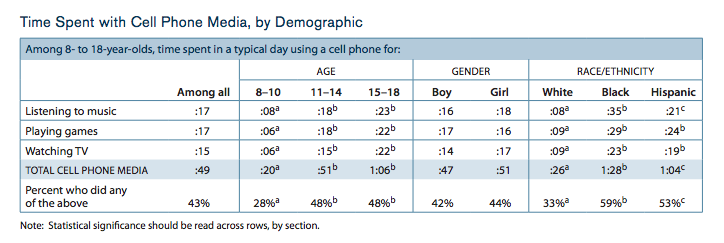
In the many links below the archived video of Watkins’ session on connectedlearning.tv is a link to the Kaiser Family Foundation’s Generation M2 study. As I read through that one, I found it curious that the study only categorized time spent with cell phone media three ways: listening to music, playing games, and watching TV. (Here’s the chart.)#

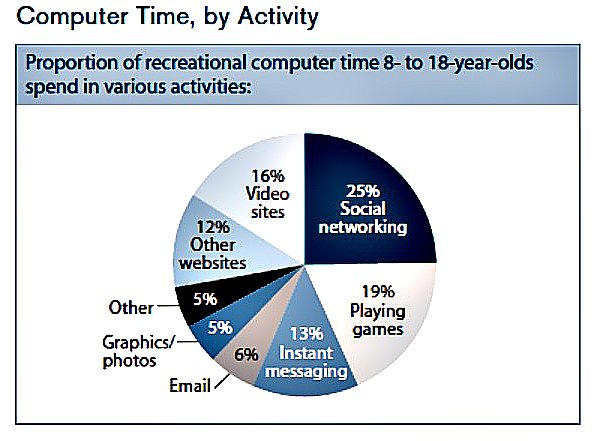
On the other hand, the study categorized computer use in eight ways. (Here’s that chart.)


This raised a few questions for me. First, why paint such a limiting picture of mobile media use on cell phones when these devices support all of the practices attributed to computer time? Just by approaching the different devices this way, the report suggests a disparity of media practices that may not exist.

I also wondered, looking at this pie chart, how can researchers make the distinction between “social networking” and these other media practices, many of which take also take place on social networks. YouTube probably qualifies as a video site, but it also is a social network. On Facebook- the social network- users play games, instant message one another, and create, edit and share photos and videos. “Social networking” is such a general verb, that it really only identifies the platform on which teens might interact with peers and media.

Especially as teachers endeavor to explore interest-driven practices of youth with digital tools, we can continually refine how we examine those practices.

Resources: 
"Digital Differences." Pew Research Center's Internet & American Life Project. Web. 03 June 2012. <http://pewinternet.org/Reports/2012/Digital-differences/Overview.aspx>.

"Report: Generation M2: Media in the Lives of 8- to 18-Year-Olds - Kaiser Family Foundation." Kaiser Family Foundation. Web. 03 June 2012. .

Tuesday, May 1, 2012

Leave the essay grading to the machines...


Grading essays is easy. Over the years, I have laid out anchor papers for each grade category in my four point scale, 4-1, for our local standardized test in order to illustrate for my middle school students the characteristics of papers in each category. They generally pick it up pretty quickly. My 7th graders can tell me which papers have strong word choice, a variety of sentence types and  descriptive language. Forgive me if I don't panic at the news that computers can do this well.

Let the machines have the grading. Grading essays is easy. Preservice and novice teachers can identify errors and assess the readability of a student paper with very little support. Grading isn't the hard part and it is better left to AI. As a teacher, I don't want to take up my pick axe and try to race a steam shovel. I'm much rather focus on helping students do the things that only humans can do. 

In Results Now, a book about the rich potential for improving outcomes in schools, Mike Schmoker argues that students should write more in schools and teachers should grade less in order to improve literacy development. Basically, the argument sounds like this: teachers can focus too much time on providing feedback to students who do not have sufficient time to practice the skills and tasks the teacher is assessing. Students can become overwhelmed at best, and discouraged at worst, in their writing practice. Professional writers will tell you that writing requires regular daily practice and routine setbacks. Traditional grading and feedback can interfere with the development of young writers. 

In her book Grammar to Enrich and Enhance Writing, Constance Weaver argues in favor of a generative rhetoric in writing instruction rather than a corrective rhetoric. Simply put, she suggests that we ought to teach students how generate strong writing, instead of teaching them what not to do, a commonplace approach to working with developing writers. We need humans to establish a generative rhetoric in schools. 

 The hard parts are the things we need humans to do. We need humans to create a community of writers who share their work and respond constructively to each other's work. We need humans to teach and support processes for generating ideas, planning and drafting. Humans can help humans think through the purpose and audience for written work and help students revise with those essential pieces in mind. Humans can expose students to different genres and written structures. Humans need other humans to learn how to generate strong writing. Let the machines highlight errors. 

Saturday, March 3, 2012

Technology for community sake #Change11


Right before I show YouTube videos by Michael Wesch in professional development workshops, I always take a quick poll of the audience, asking who has heard of the Kansas State professor. In the last four weeks, I have had the opportunity to lead three variations of the same professional development workshop, with audiences ranging in size from 13 to 35. I average about one raised hand each time I ask. This comes as both good and bad news; good because I can keep showing the videos and asking participants, most of whom are inspired by 4 minutes of hearing Wesch speak, about the implications of his work for K-12 public education; bad because it indicates to me that K-12 educators, confronted by the same issues of scale and relevance that Wesch tries to optimize in his courses at Kansas State, have not heard of his cutting-edge work.


In this video, A Vision of Students Today, Wesch’s students famously publish the statistical results of a class survey they did on a Google Doc. In other talks Wesch has done, among them this address to the University of Manitoba in 2008, he details how he uses web portals to aggregate class resources and student work.  

The tech integration in these videos in not about portals, wikis and RSS feeds. I see Wesch gathering student data in new ways, employing a strategy not unlike a very low-tech system like “Fist to Five Feedback,” where the teacher asks students to quickly assess the success of her lesson.

When I read a recent article in the Chronicle of Higher Education by Jeffrey Young, I realized that the importance of Wesch’s could elude the higher ed community. The article dismisses Wesch’s use of technology as a strategy that other professors are unable to apply, and then concludes that he is just talented, so his methods don’t matter. A talented lecturer might be just as effective using less interactive methods, according to Young.

Participants in technology workshops I lead readily agree that the purpose behind integration matters more than the tools. This is especially true in Wesch’s case. When a colleague of his remarks that they tried his methods and had them result in “chaos,” I worry that institutions cannot see past tools to instructional purposes. 


My biggest worry is that we might watch powerful practices enhanced by technology and see only the technology. We might not notice that Wesch asked his students, his paying customers, what it is like to be a student in his class and then used technology to maximize their experiences as learners.We might forget that when his students report that their professors don’t know their names, he uses technology to create social connections for them in a class of 200. We have to see past his web platform to think critically about his purpose.

When technology gives us the ability to hear from all students all the time, what questions will we ask them? Wesch asks his students about relevance and significance. If we don’t know what questions to ask, it doesn’t matter how well the technology helps us aggregate the answers.

Saturday, January 7, 2012

Talking while the teacher is talking: learning in the back channel of #change 11


I’ve experimented with back channels in my 7th grade language arts classroom. On occasion, I used it as a way to focus students’ attention during Socratic circles. The outer circle of students, three times larger than the inner, armed with netbooks, had to respond on a wiki page discussion thread to the participants’ comment during the discussion. The outer circle recorded questions, reactions and quotations from the one participant they tracked. Since I was working with adolescents, the silent social opportunity during the Socratic circle kept everyone active and engaged, which can be a challenge when the outer circle has to sit quietly and record on tally sheets or some other paper record to track the conversation.

So, I believe in the potential of back channels and was excited to participate in the chat room during both of Howard Rheingold’s live sessions for the MOOC this week. From past experiences in Blackboard Collaborate, I’ve grown accustomed to the webinar format and I bounced my attention from the chat thread to the video feed of Rheingold’s presentation. It was interesting to participate this way. He taught us that there is no such thing as multi-tasking, just task switching. According to Rheingold, we pay attention costs with each switch.

With that learning in mind, I reflected on my participation. Between the two sessions I felt at times engaged, rewarded and distracted by the chat.

I wonder: What are the implications for teaching and learning in back channels, when participants effectively talk while the teacher is talking?

I’m thinking of ways participants might revisit the back channel transcript to support ongoing thoughtful participation and so that we might better understand the potential. Here are three possibilities I see for using the back channel transcript:

1. Have participants search through a transcript of the back channel and code their responses based on how they feel their participation impacted their attention to the session or their learning.

2. Ask participants to connect the small, quick discussions with other discussions online. For example, search for discussion forums and comment threads elsewhere online where participants might extend their conversations. (A quick teacher discussion in a chat room might easily connect to some of the larger group discussion threads on edutopia.org, for example.)


3. Ask each participant to identify the most important post in the back channel and blog about that immediately afterward.

Please add any suggestions you might have in the comments.